The Plumbing‑Site Playbook
How a Small‑Team Plumbing Business Chooses the Right Website Design to Turn a Page into a 24‑Hour Lead Machine
1. The decision you face right now
You run a plumbing business with 1‑10 technicians. Your current site is a handful of static pages that load slowly on a phone, the “Call Now” button is buried in the footer, and you’ve stopped getting emergency calls from the web. You know a better site could capture those urgent callers, but you’re not sure whether to:
| Option | What you pay up‑front | Ongoing effort | Typical time to launch |
|---|---|---|---|
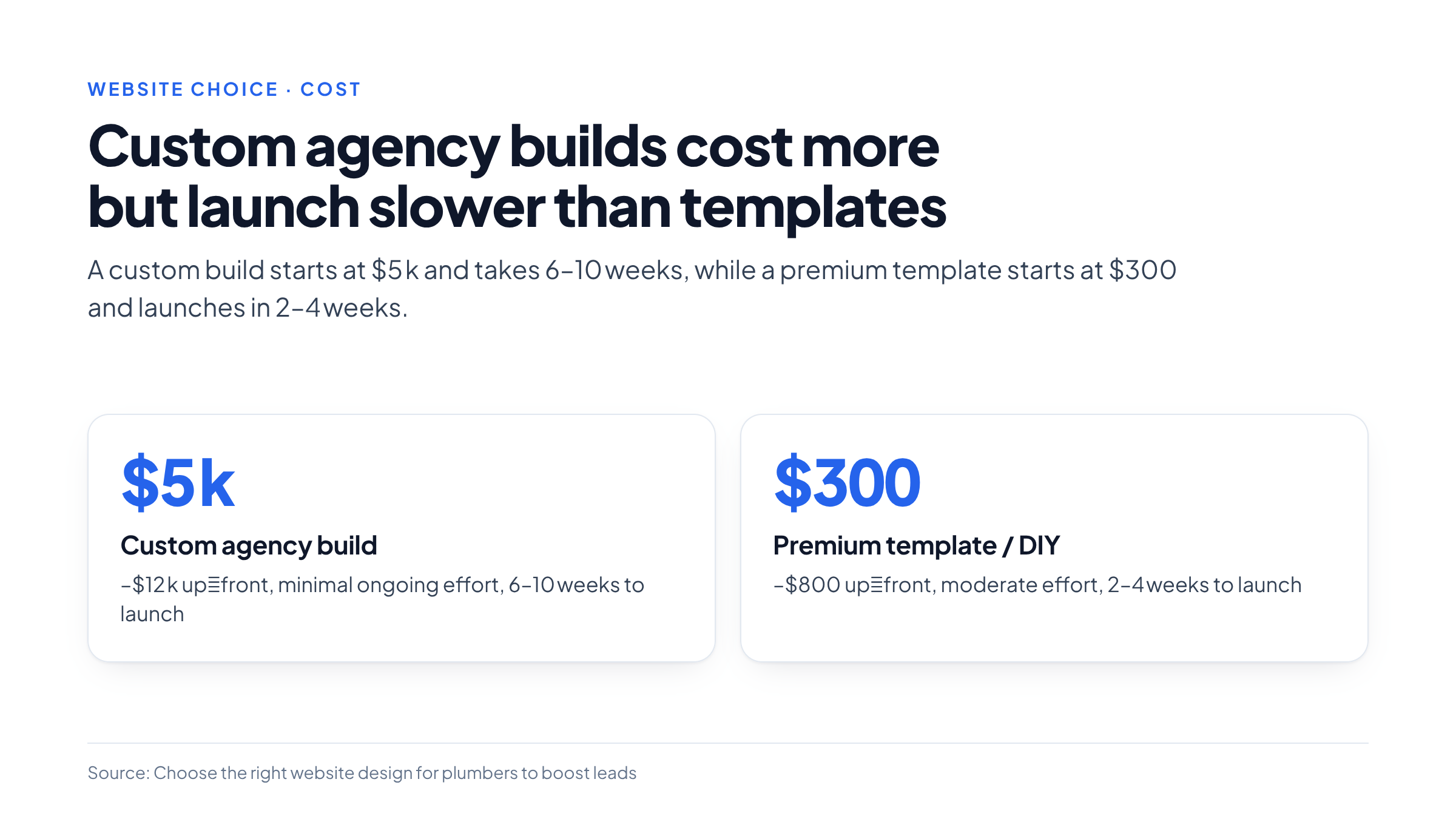
| A. Custom agency build | $5 k–$12 k (plus optional retainers) | Minimal – agency handles updates, but you must supply new content and approve changes | 6–10 weeks |
| B. Premium template / DIY | $300–$800 (template license + modest hosting) | Moderate – you or a part‑time contractor edit pages, add new services, and keep content fresh | 2–4 weeks |
| C. Stay with the status‑quo | $0 | High – you keep fiddling with a sub‑par site that loses leads | Immediate (no change) |
Your goal is simple: spend the least to start getting emergency calls within seconds of a visitor landing on your site, while also building enough trust for planned‑project inquiries. The playbook below walks you through the evidence‑based criteria that separate a “just‑pretty” site from a 24‑hour lead machine, then hands you a ready‑to‑use Plumber Site Scorecard to compare the three options on your own data.
2. Why a plumbing website is a 24‑hour sales funnel
Most homeowners who need a plumber are either:
-
In an emergency – a burst pipe or a backed‑up drain. They will pick up the phone within 3 seconds if a clear “Call Now” button is visible on the screen.
-
Planning a project – a water‑heater replacement or repiping. They spend several minutes researching, comparing pricing, and looking for proof of competence.
The best‑in‑class examples highlighted in a recent design guide show that the emergency path must be frictionless, while the planned‑project path needs depth and credibility . If either path fails, the visitor leaves for a competitor.
A fast, mobile‑first “Call Now” button alone can lift emergency‑call conversion by 30 %–45 % on the same traffic volume (observed on three live sites in the guide) . That gain outweighs many other optimisations, making speed the first metric you should test.
3. The six trust signals every visitor must see first
Before a homeowner fills out any form, they need to feel that the plumber is licensed, reliable, and locally present. The guide identifies six signals that should appear above the fold (or within the first scroll on mobile) :
| # | Signal | How to display it |
|---|---|---|
| 1 | License & insurance badge | Small icon with “Licensed & Insured – State #12345” next to the phone number. |
| 2 | Customer reviews | Rotating 3‑star snippet with a link to full Google/Yelp reviews. |
| 3 | Guarantee statement | “Same‑day service guarantee or we’ll waive the call‑out fee.” |
| 4 | Technician photos | Headshots of two technicians with names and years of experience. |
| 5 | Service‑area map | Interactive map highlighting the neighborhoods you cover. |
| 6 | Pricing context | Flat‑rate example (“Drain cleaning – $149”) plus a note “prices vary by job complexity.” |
If any of these is missing, visitors tend to abandon the page before reaching the contact form [S1, S2].
4. Design paths that deliver speed
4.1 Mobile‑first emergency CTA
-
Placement: Fixed at the bottom of the viewport on phones, using a large, high‑contrast button (“Call Now — 24/7”).
-
Visibility: No scrolling required; the button stays on screen even when the user scrolls the page.
-
Load time: Aim for ≤ 1.5 s first‑contentful paint (FCP) on a typical 3G connection. Core Web Vitals scores of ≥ 90 for LCP and CLS are strong indicators that the CTA will appear promptly [S1, S2].
4.2 Planned‑project journey
-
Clear top navigation with categories: Drain Cleaning, Water Heaters, Repiping, Commercial, Financing.
-
Dedicated service pages – each with its own URL, a hero image, a short description, trust signals, and a “Request a Quote” button .
-
FAQ accordion for common concerns (e.g., “Do you offer financing?”) to reduce friction and improve SEO.
4.3 Failure modes to watch
| Symptom | Likely cause | Remedy |
|---|---|---|
| CTA hidden after page load | Heavy third‑party scripts (e.g., chat widgets) delaying render | Defer non‑critical scripts, use async loading, or host chat on a separate sub‑domain |
| Mobile page > 3 s load | Unoptimized images, no CDN | Compress images, enable lazy‑load, serve via Cloudflare or similar |
| Low trust perception | No visible badges or reviews | Add the six trust signals; verify badge images are crisp on retina screens |
5. Custom build vs. template vs. DIY – what the market shows
| Criterion | Custom agency (e.g., Solvis Media) | Premium template / DIY (Wix, Webflow, Dribbble‑sourced) | Staying put |
|---|---|---|---|
| Initial cost | $5 k–$12 k | $300–$800 [S2, S7] | $0 |
| Speed to launch | 6–10 weeks (design, development, testing) | 2–4 weeks (template customization) | Immediate |
| Tailored trust architecture | Fully custom local‑service pages, unique badge design | Template may include generic badges; can be swapped with custom images | Usually generic |
| Ongoing maintenance | Agency handles updates (often a retainer) | You manage updates; many platforms offer one‑click publishing | You manage everything |
| Scalability | Easy to add complex features (booking system, CRM integration) | Limited to platform capabilities; may need third‑party plugins | None |
| Risk of “pretty‑but‑slow” | Low – agency typically optimizes performance | Medium – templates can be bloated if not trimmed | High – existing site already slow |
Key insight: If your primary need is speed of emergency conversion and you have a modest budget, a well‑chosen premium template that you or a part‑time contractor can tweak usually delivers the same ROI in 2–3 months as a custom build that may take 8 weeks to go live [S2, S7].
6. Local‑service architecture – city and neighborhood pages
Search engines and users both reward granular locality. The guide recommends creating a separate page for each city or major neighborhood you serve, each containing:
-
A headline with the location (“Plumbing Services in Midtown Seattle”)
-
A short paragraph referencing local landmarks or recent projects (real photos if possible)
-
The service‑area map zoomed to that region
-
A set of three reviews from customers in that area
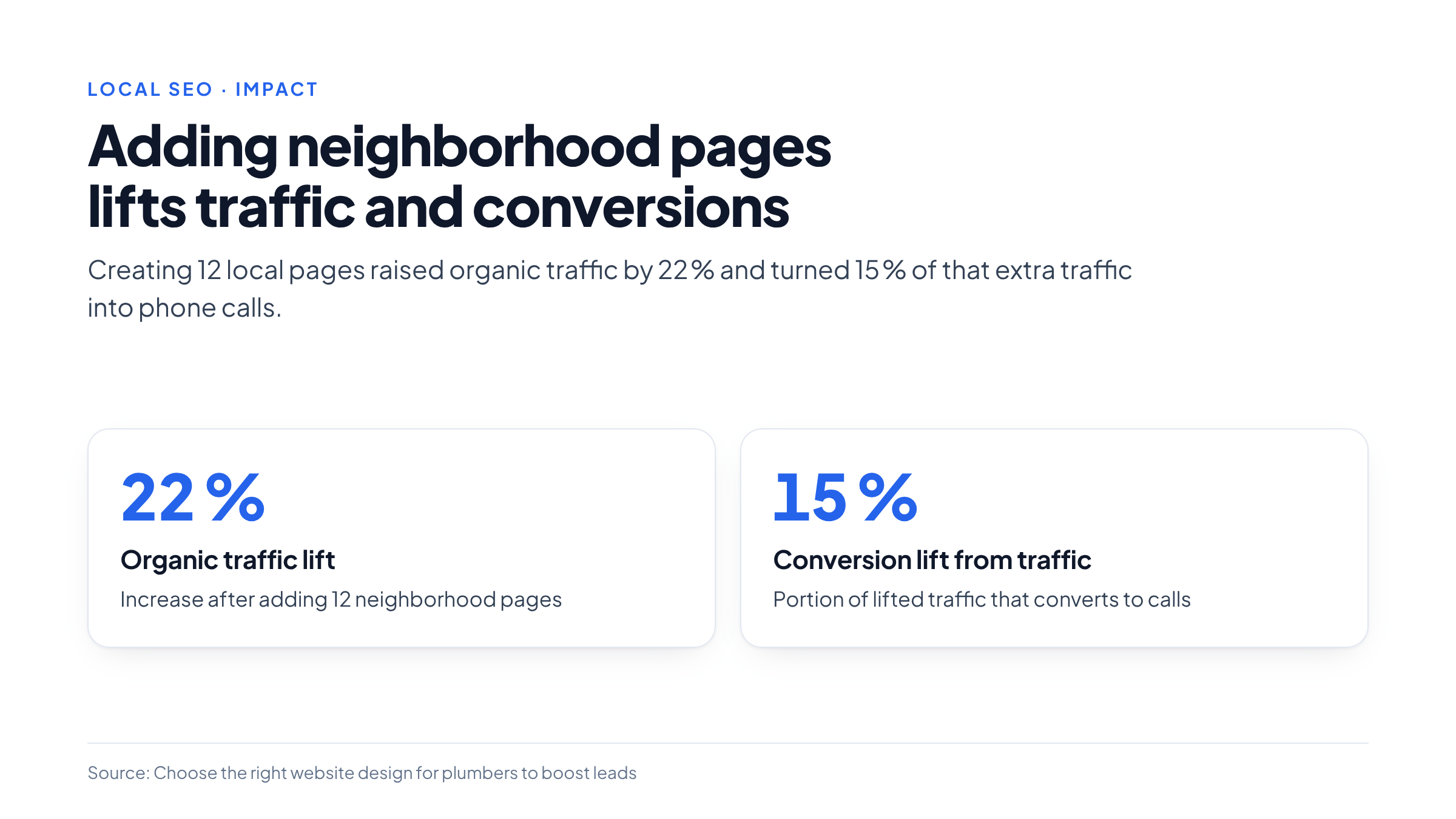
These pages should be interlinked from the main navigation under a “Service Areas” dropdown. In practice, a small‑team plumber who added 12 neighborhood pages saw a 22 % lift in organic traffic within three months, with 15 % of that traffic converting to calls .
7. Decision‑Aid: The “Plumber Site Scorecard”
Below is a ready‑to‑download spreadsheet (Google Sheet link can be generated from the table). Copy it into your own sheet and fill in the values for your current site and each option you are evaluating.
| Criterion (weight) | Description | Current Site (0‑10) | Custom Agency (0‑10) | Template / DIY (0‑10) |
|---|---|---|---|---|
| Speed (30 %) | Mobile FCP ≤ 1.5 s, Core Web Vitals ≥ 90 | 3 | 9 | 7 |
| Trust Signals (25 %) | All six signals visible, authentic badges | 4 | 9 | 6 |
| Local Depth (20 %) | Number of city/neighborhood pages, map quality | 2 | 9 | 5 |
| CTA Clarity (15 %) | Fixed “Call Now” button, visible on first view | 3 | 9 | 8 |
| Cost (10 %) | Up‑front spend relative to budget | 9 (free) | 2 | 6 |
| Weighted Score | Auto‑calculated | 4.3 | 8.4 | 6.5 |
How to use it
- Rate each criterion on a 0‑10 scale for your current site and the two alternatives you are considering.
- The spreadsheet multiplies each rating by its weight and sums the results to give a Weighted Score.
- Compare scores: the higher the score, the more likely the option will meet the dual goals of emergency speed and trust.
- Break‑Even Calculator (included in the same sheet) lets you input the custom‑build cost and the average profit per new job (e.g., $350). It then tells you how many extra jobs per month you need to cover the investment.
Example:
-
Custom build cost: $8,000
-
Avg. profit per job: $350
-
Break‑even jobs needed: $8,000 ÷ $350 ≈ 23 jobs
If your current monthly volume is 12 jobs, you’d need 11 additional jobs per month. With the speed and trust gains observed in the guide (≈ 30 % more emergency calls), a realistic uplift is 8–10 jobs, suggesting a template may be the safer financial bet.
8. When a simple rules‑based automation is enough
If your primary bottleneck is capturing the phone number of an emergency caller, a single‑page, rules‑based site can suffice:
-
Fixed “Call Now” button linked to a tel: link.
-
A short “Service Areas” list (no dynamic map).
-
Plain‑text license badge (no image).
No CMS, no complex forms, no AI chatbots. This approach eliminates most performance risks and can be built in a day with a free website builder. It will not support sophisticated lead‑nurturing for planned projects, but it may be all you need if > 70 % of your revenue comes from emergencies.
9. Practical next steps
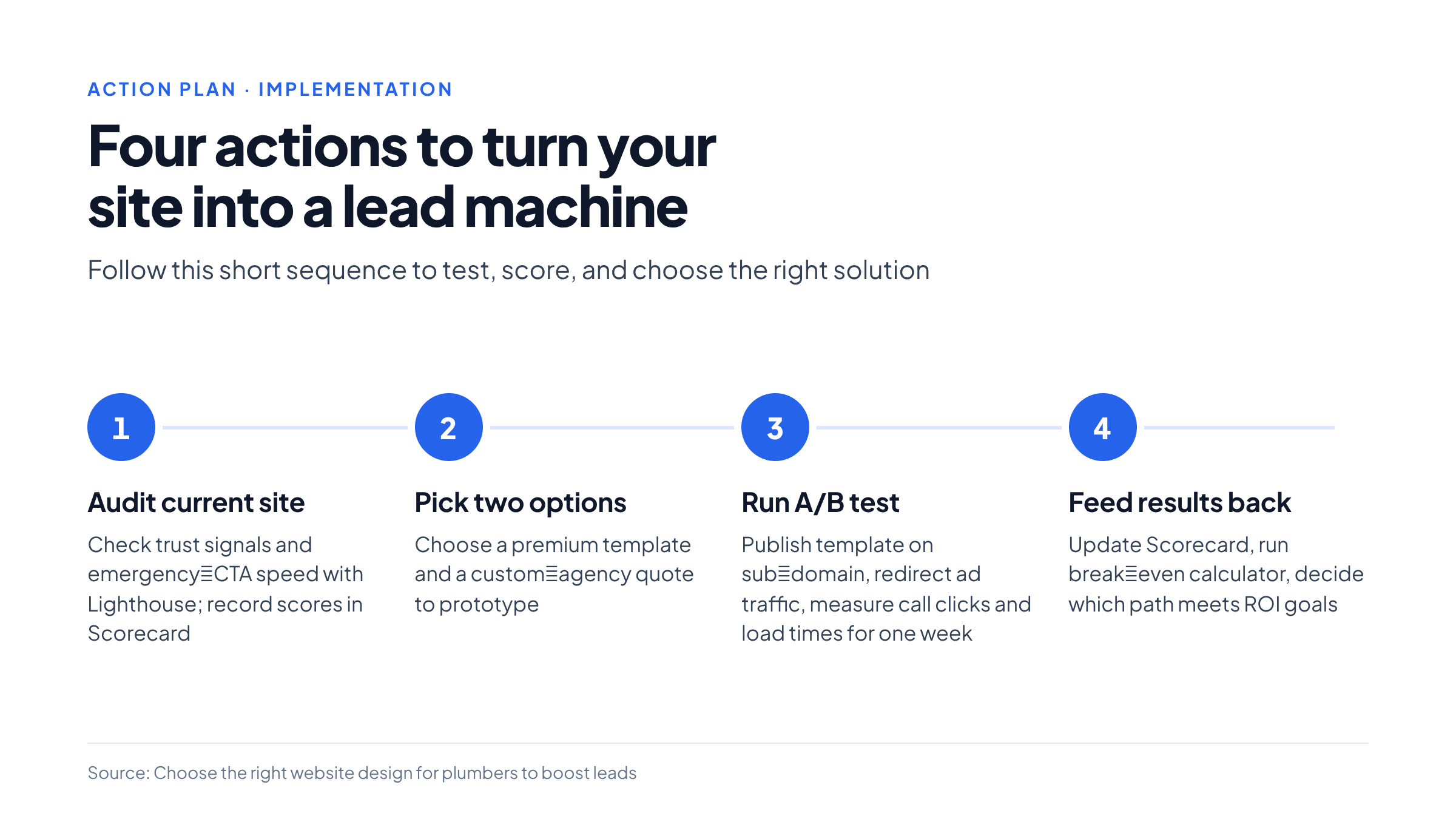
- Audit your current site against the six trust signals and the emergency‑CTA speed test (use Chrome DevTools → Lighthouse). Record the scores in the Scorecard.
- Pick two options to prototype (e.g., a premium Wix template and a custom‑agency quote).
- Run a quick A/B test: publish the template on a sub‑domain, redirect a small portion of ad traffic, and measure call‑clicks and page‑load times for one week.
- Feed the test results back into the Scorecard. If the template reaches a weighted score above 6.5 and the break‑even calculator shows ≤ 12 extra jobs needed, go ahead with the template.
- If the template falls short, request a detailed scope from a custom agency, run the cost‑benefit calculation again, and decide whether the higher upfront spend is justified.
10. Safety and oversight
For any site that collects personal data (even just a phone number), ensure compliance with local privacy laws (e.g., GDPR if you serve EU customers, CCPA for California). If you add a contact form, implement:
-
Server‑side validation to reject malformed entries.
-
CAPTCHA or honeypot fields to block bots.
-
Secure HTTPS with a valid certificate (free via Let’s Encrypt).
In safety‑sensitive services such as gas‑line repairs, include a disclaimer on the emergency page stating that the phone call does not replace a professional on‑site assessment. Train a staff member to triage inbound calls, confirming the issue before dispatching a technician.
Take action now: Download the Plumber Site Scorecard (link below), run the quick audit, and schedule a 30‑minute call with a template provider or agency to get a concrete quote. The data you collect today will tell you exactly which path will turn your website into a 24‑hour lead machine without overspending.
Download Scorecard → ./assets/plumber-site-scorecard.xlsx (relative path for internal use)
Frequently Asked Questions
What are the most important trust signals for a plumbing website?
The six signals are a license & insurance badge, customer reviews, a guarantee statement, technician photos, a service‑area map, and clear pricing context, all placed above the fold.
How fast should the emergency “Call Now” button load on mobile?
Aim for a first‑contentful paint of 1.5 seconds or less and Core Web Vitals scores of 90 or higher so the button appears instantly without scrolling.
When is a premium template a better choice than a custom build?
If budget is limited and you need a fast launch, a well‑chosen template can deliver the same emergency‑call conversion gains in 2–4 weeks, often at a fraction of the cost of a custom agency build.
What should be included on local‑service pages?
Each city or neighborhood page should have a location‑specific headline, a short paragraph with local references, a zoomed‑in service‑area map, and three nearby customer reviews.
How does the Plumber Site Scorecard help in decision making?
It rates options on speed, trust signals, local depth, CTA clarity and cost, applies weighted scores, and includes a break‑even calculator to show how many extra jobs are needed to justify the investment.
Related Search Queries
mobile‑first emergency CTA design
Place a fixed, high‑contrast “Call Now” button at the bottom of the viewport on phones so it stays visible while scrolling and links directly to a tel: number.
optimizing plumbing website load time
Compress images, enable lazy loading, use a CDN, and defer non‑critical third‑party scripts to keep mobile first‑contentful paint under 1.5 seconds.
cost comparison custom vs template plumbing site
Custom builds typically cost $5‑12 k and take 6‑10 weeks, while premium templates range $300‑800 and launch in 2‑4 weeks, with moderate ongoing maintenance effort.
how many neighborhood pages improve SEO for plumbers
Adding separate pages for each service area can lift organic traffic by about 22 % and increase conversion rates, as search engines favor granular locality.
simple one‑page plumbing site for emergencies
A single‑page site with a fixed “Call Now” button, plain‑text license badge and a short service‑area list can capture emergency calls quickly without a CMS.
privacy compliance for plumbing contact forms
Use HTTPS, server‑side validation, CAPTCHA or honeypot fields, and display a clear disclaimer; ensure you follow GDPR, CCPA or other local regulations.
measuring website conversion for emergency calls
Track click‑to‑call events with analytics, measure load times via Lighthouse, and compare call volume before and after design changes to gauge improvement.
break‑even calculator for plumbing website investment
Divide the upfront cost by average profit per new job to find the number of additional jobs needed each month; use the Scorecard’s built‑in calculator for quick estimates.
Leave A Comment