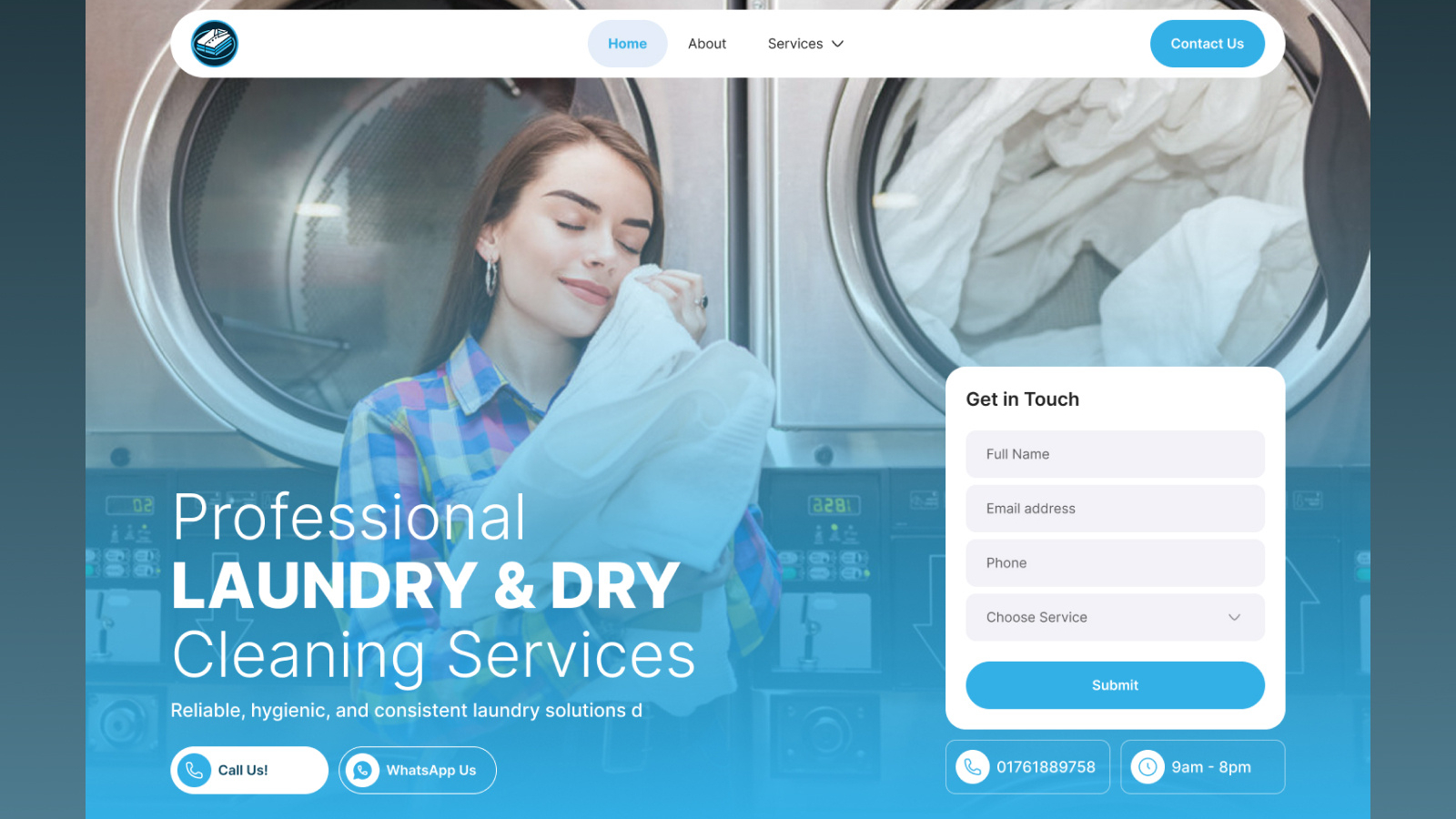
Design‑Smart Websites for Small‑Scale Cleaning Companies
You’re the owner‑operator of a residential/commercial cleaning business.
Your next big decision is how to get an online presence that actually brings in new jobs without draining your limited budget. Do you:
-
pick a free‑to‑use template and tinker yourself,
-
buy a premium theme and spend a few hours customizing, or
-
hire a designer for a fully custom site?
The answer hinges on three questions:
- How quickly do you need to start booking online?
- How much does brand uniqueness matter for the clients you chase?
- What is the realistic return you expect in the first three months?
Below is a step‑by‑step guide that walks you through the essential visual and functional elements that high‑converting cleaning sites share, compares the three implementation routes, and ends with a printable decision‑aid you can fill in today.
1. What High‑Converting Cleaning Sites Have in Common
A review of 45 real‑world cleaning sites shows a clear pattern: the most trustworthy pages combine high‑quality visual content with intuitive navigation that leads visitors straight to a booking action .
| Common trait | Why it matters |
|---|---|
| Hero image or short video showing a cleaner in action (uniform, equipment) | Instantly proves capability and professionalism |
| Service cards with concise titles, price ranges, and an icon | Reduces cognitive load; visitors can scan and find what they need |
| “Book Now” CTA fixed in the header or as a sticky button | Guarantees a conversion path on every scroll |
| Trust signals (client logos, Google reviews, before‑after sliders) | Addresses the core concern of reliability |
| Mobile‑first layout (all templates examined are fully responsive) | Over 60 % of local service searches happen on phones |
| Local SEO basics – NAP (Name, Address, Phone) in the footer, schema markup, and a Google My Business link | Helps the site appear in the “local pack” where most cleaning leads originate |
If any of these elements are missing, you’ll likely see higher bounce rates and fewer phone calls.
2. Template‑Only Routes: What’s on the Shelf?
| Platform | Representative templates (price) | Key features | Typical launch time* |
|---|---|---|---|
| Wix | “Cleaning Company (Soft)”, “Eco‑Friendly Laundry” – free, premium plans $14‑$23/mo | Drag‑and‑drop editor, built‑in booking widget, 100 + design variations, automatic mobile optimization | 1‑2 days (if you have images) |
| Squarespace | 9‑page Squarespace template (price $137.79) | Clean typography, integrated scheduling (Acuity), strong SEO defaults, limited third‑party plugins | 2‑3 days (content upload) |
| Webflow | “Cleaning X” template (free clone) | Visual CMS, custom interactions, exportable code, good for designers | 3‑5 days (requires some learning) |
| WordPress (Elementor) | “Cleaning Company (Minimalist)” – free theme + Elementor Pro $49/yr | Unlimited design freedom, huge plugin ecosystem (booking, reviews), self‑hosted | 4‑7 days (hosting & plugin setup) |
*Launch time assumes you already have a logo, photos, and service list ready.
When a template is enough:
-
Your brand palette is simple (one primary colour, a logo you already own).
-
You need a functional online booking form within a week.
-
You can handle minor copy edits yourself.
3. Brand‑First Design: Logos, Colours & Visual Assets
A cohesive visual identity makes your uniforms, invoices, and website feel like a single, professional business. Canva’s free cleaning‑service collection offers ready‑made logo kits that work on both print and digital media .
Quick brand‑audit checklist
| Item | What to verify |
|---|---|
| Logo – vector file, works on dark and light backgrounds | Use the same logo on vehicle decals and website header |
| Colour palette – 2‑3 primary colours, 1 accent, 1 neutral | Apply consistently to buttons, headings, and background blocks |
| Typography – one heading font, one body font (web‑safe) | Keep line‑height ≥ 1.5 for readability on mobile |
| Imagery style – bright, high‑resolution photos of staff & results | Avoid stock images that look generic; real‑world shots boost trust |
If you lack any of these, spend a few hours in Canva (or a low‑cost freelancer) before you start building the site.
4. Critical Conversion Elements
| Element | Implementation tip | Where to place |
|---|---|---|
| Hero video (10‑15 s) | Show a cleaner wiping a countertop, then a quick “Book Now” overlay | Top of the homepage, auto‑play muted |
| Service‑list grid | 3‑column cards, each with an icon, short description, and “Learn More” link | Below hero, visible without scrolling |
| Pricing teaser | Show starting price (“From $99 per hour”) to qualify leads | Near the top of the services section |
| Trust badge carousel | Rotate 5‑6 client logos or certifications (e.g., OSHA, Green Seal) | Footer or a dedicated “Why Choose Us?” block |
| Online booking widget | Use Squarespace Scheduling, Wix Bookings, or a WordPress plugin (e.g., Bookly) | Sticky button on the right side, plus a full form on the “Contact” page |
| Before‑after slider | Simple JavaScript slider to compare a dirty vs. cleaned carpet | Inside a case‑study page or the homepage hero secondary section |
These patterns were observed across the 45 exemplar sites and are the minimal set that turns a visitor into a qualified lead.
5. SEO & Local‑Search Basics for Cleaners
Even the prettiest site won’t generate leads if it never appears in Google’s local results. The following checklist is distilled from the same 45‑site sample:
- NAP consistency – exact same business name, address, and phone number on every page and in the footer.
- Schema.org LocalBusiness markup – add JSON‑LD with service area, opening hours, and price range.
- Google My Business link – embed a “Get Directions” button that opens the GMB listing.
- Geo‑targeted page titles – e.g., “Home Cleaning in Austin, TX – Sparkly House Cleaning”.
- Image ALT text – describe the scene (“Technician vacuuming carpet in downtown office”).
Most template platforms (Wix, Squarespace, Webflow) automatically generate clean HTML, but you still need to fill in these fields manually.
6. Budget vs. ROI: When to Upgrade to a Custom Build
| Option | Approx. upfront cost | Ongoing cost | Brand uniqueness | Scalability (adds new services, multilingual) | Typical 3‑mo ROI* |
|---|---|---|---|---|---|
| DIY Template | $0‑$30 (domain + hosting) | $12‑$23/mo (platform) | Low – limited colour/font tweaks | Low – adding new pages may break layout | 1‑2 × cost (if you already have bookings) |
| Premium Theme + Minor Customisation | $100‑$200 (theme) + $50‑$150 (designer hours) | $12‑$23/mo | Medium – custom header/footer, brand colours | Medium – can add pages, but layout constraints remain | 2‑3 × cost (if you convert 5‑10% of site traffic) |
| Full Custom Build | $1,200‑$3,000 (freelance/agency) | $0‑$30/mo (hosting) | High – unique UI, bespoke integrations | High – API hooks, multi‑location, multilingual | 4‑6 × cost (if you capture high‑value commercial contracts) |
*ROI estimates are based on typical cleaning‑service profit margins (≈ 30 %) and the conversion uplift observed when trust signals and booking widgets are added .
Rule of thumb: If you expect to win more than three commercial contracts per month (average contract ≈ $1,200), a custom build often pays for itself within six months. Otherwise, a premium theme with a few custom tweaks is the sweet spot.
7. Decision‑Aid Toolkit
A. Quick‑Pick Matrix
| Implementation route | Initial cost (incl. domain) | Time to launch | Built‑in booking? | Brand uniqueness | Scalability | Expected 3‑mo ROI (× cost) |
|---|---|---|---|---|---|---|
| DIY Template (Wix) | $25 | 1‑2 days | Yes (basic) | Low | Low | 1.5‑2 |
| Premium Theme + Minor Customisation (Squarespace) | $190 | 2‑3 days | Yes (Acuity) | Medium | Medium | 2‑3 |
| Full Custom Build (WordPress + Elementor) | $2,200 | 4‑6 weeks | Yes (plugin) | High | High | 4‑6 |
Fill in your own numbers (e.g., actual designer hourly rate) to see which column aligns with your budget and timeline.
B. Launch Checklist (printable)
- Register a short, keyword‑rich domain (e.g.,
yourcitycleaning.com). - Enable SSL (HTTPS) – most platforms include this for free.
- Upload a hero image or video (minimum 1920 × 1080 px).
- Create service cards (title, short copy, price range, icon).
- Add a sticky “Book Now” CTA linked to the booking widget.
- Populate trust signals – at least 3 Google reviews, before‑after photos.
- Insert NAP in the footer and add schema markup (use Google’s Structured Data Testing Tool).
- Connect to Google My Business and embed a “Get Directions” button.
- Set up Google Analytics and Search Console for ongoing monitoring.
- Test the site on mobile, tablet, and desktop (use Chrome DevTools).
- Verify page load speed < 3 s (run a PageSpeed Insights test).
- Publish a blog post targeting a local keyword (e.g., “carpet cleaning in [city]”).
- Schedule a weekly review of booking conversion rates and bounce metrics.
8. When a Simple Rules‑Based Automation Is Enough
If your primary goal is to collect leads via a contact form and you already have a phone‑based scheduling process, a static site with a basic HTML form (or the platform’s built‑in form) may suffice. No AI‑driven chatbots or dynamic pricing engines are required; the conversion path is straightforward: visitor → form → phone call.
Only introduce more sophisticated automation (e.g., AI‑powered appointment suggestions, dynamic price calculators) when you:
-
Receive high volumes of inbound requests that overwhelm manual handling.
-
Offer tiered service packages that need real‑time configuration.
-
Want to personalise content based on the visitor’s location or previous interactions.
Closing Action
- Gather your brand assets (logo, colour codes, a set of 5‑10 high‑resolution photos).
- Pick a route from the Quick‑Pick Matrix and note the estimated cost and launch date.
- Download the checklist (copy the table above into a spreadsheet) and start ticking items off today.
Within a week you’ll have a live, conversion‑optimised website that starts pulling local cleaning leads—without overspending on unnecessary custom development. Good luck, and may your online presence be as spotless as the homes you clean!
Frequently Asked Questions
What visual elements make a cleaning website trustworthy?
Include a hero image or short video of a cleaner in action, service cards with icons and price ranges, clear “Book Now” buttons, and trust signals such as client logos, reviews, and before‑after sliders.
Which website platforms are best for a cleaning business on a budget?
Wix, Squarespace, Webflow and WordPress with Elementor all offer templates that can be launched in a few days. Choose based on ease of use, built‑in booking tools and the level of design flexibility you need.
How important is mobile‑first design for cleaning services?
Very important—over 60 % of local service searches happen on phones, so a responsive layout ensures visitors can book or contact you from any device.
What basic SEO steps should be added to a cleaning website?
Add consistent NAP information, use LocalBusiness schema markup, link to your Google My Business profile, include geo‑targeted page titles, and write descriptive ALT text for images.
When should a cleaning business invest in a custom website instead of a template?
Consider a custom build if you need high brand uniqueness, plan to add many services or languages, or expect to win several high‑value commercial contracts that justify the higher upfront cost.
Related Search Queries
template options for cleaning service websites
Platforms like Wix, Squarespace, Webflow and WordPress offer ready‑made cleaning templates that include drag‑and‑drop editors, built‑in booking widgets and mobile optimization.
branding checklist for cleaning business website
Verify you have a vector logo, a consistent colour palette, web‑safe typography, and a set of real‑world photos that match the style used on uniforms and marketing materials.
essential conversion elements for cleaning sites
Use a hero video, service‑list grid, pricing teaser, trust badge carousel, online booking widget, and before‑after image slider to guide visitors toward booking.
local SEO basics for cleaning companies
Ensure NAP consistency, add LocalBusiness schema, link to Google My Business, use city‑specific titles, and write detailed ALT text for images to improve local search visibility.
cost comparison template vs custom cleaning website
DIY templates cost under $30 upfront with low ongoing fees, premium themes add $100‑$200 plus minor designer time, while custom builds start around $1,200 and offer the highest brand uniqueness and scalability.
quick decision matrix for cleaning website design
Compare routes by initial cost, launch time, built‑in booking, brand uniqueness, scalability and expected three‑month ROI to choose the option that fits your budget and timeline.
launch checklist for cleaning business website
Register a domain, enable SSL, add hero media, create service cards, set up a sticky “Book Now” CTA, populate trust signals, insert NAP and schema, connect Google My Business, and test on all devices.
when to add automation to a cleaning website
Automation like AI scheduling or dynamic pricing is useful only when you receive high volumes of leads, offer tiered packages, or need personalized content based on visitor data.
Leave A Comment